
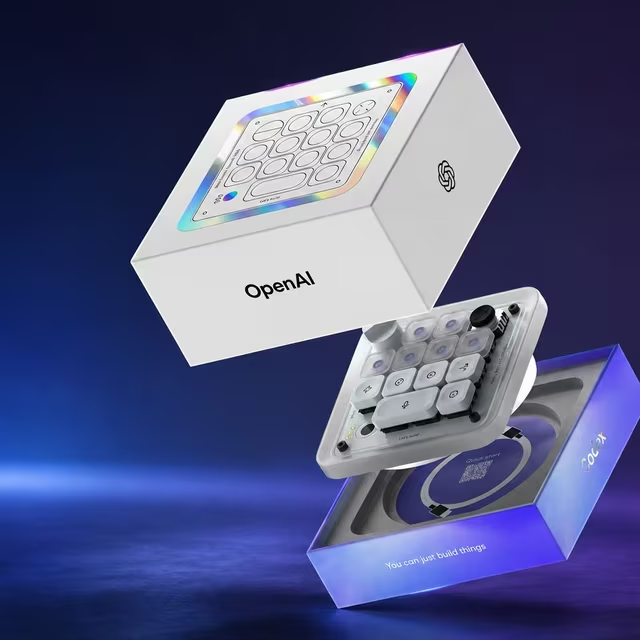
Artificial Intelligence is changing the way developers build WordPress websites. One of the latest innovations is Codex Micro, a hardware companion designed by OpenAI in collaboration with Work Louder to streamline AI-assisted development workflows. Rather than replacing your keyboard, it provides dedicated controls for interacting with Codex, making repetitive coding tasks faster and more intuitive.
For WordPress developers, Codex Micro can become a productivity tool that speeds up plugin development, theme customization, debugging, and code reviews.
What is Codex Micro?
Codex Micro is a compact programmable macro pad featuring mechanical keys, a joystick, a rotary dial, and RGB status indicators. It integrates with OpenAI Codex workflows, allowing developers to launch coding actions instantly without constantly switching between windows or typing repetitive commands.
Instead of replacing your development environment, Codex Micro acts as a shortcut controller for AI-assisted programming.
Why WordPress Developers Should Care
WordPress projects often involve repetitive coding tasks such as:
- Creating custom plugins
- Developing themes
- Debugging PHP errors
- Writing CSS and JavaScript
- Optimizing database queries
- Generating documentation
Codex Micro helps automate many of these workflows through programmable shortcuts connected to AI coding assistants.
Benefits of Using Codex Micro for WordPress
- Faster Plugin Development
You can assign buttons to:
- Generate WordPress plugin boilerplates
- Create custom post types
- Register taxonomies
- Generate REST API endpoints
- Create Gutenberg blocks
This reduces repetitive coding while maintaining WordPress coding standards.
- Quick Theme Customization
Theme developers can use Codex Micro to instantly:
- Generate template files
- Create custom page templates
- Build navigation menus
- Generate widget areas
- Improve CSS structure